Claude Just Killed
Manual Keyword Strategy

One command. Claude reads the business website, finds every service and city, and produces a Google Ads keyword table — grouped by intent, matched correctly, campaign-ready. Add the free Google Ads API for real volume and CPC.
❯ /keyword-strategy https://miamirvac.com
Fetching site... Found: AC Repair, Furnace Install, Duct Cleaning
Location: Miami FL · Coral Gables · Hialeah
Generating keyword strategy with real data...
What you get — free, no subscription required
The /keyword-strategy skill file · Google Ads API helper script (zero dependencies) · Complete setup guide with screenshots
Install and Run the Skill
Works immediately. No API keys, no scripts, no config beyond placing one file. Claude generates the keyword strategy using its knowledge of your trade and location.
Install Claude Code
Skip if already installed.Claude Code is Anthropic's official CLI. It gives Claude access to your filesystem and terminal — which is how the skill reads the business website automatically.
npm install -g @anthropic-ai/claude-code
Place the skill file
Using ~/.claude/skills/ installs the skill globally — works from any folder on your machine. Use .claude/skills/ (no tilde) for project-only access.
mkdir -p ~/.claude/skills/keyword-strategy
mv ~/Downloads/SKILL.md ~/.claude/skills/keyword-strategy/SKILL.md
Run it
Claude fetches the site, extracts your services and cities, and produces the keyword table. If it can't find them on the site, it asks you directly.
# Start Claude Code
claude

# Then type:
/keyword-strategy https://yourbusiness.com
Google Ads API Basic Access is Free
Most people don't know it exists. Basic access lets you call Google's Keyword Planner API directly — the exact same data powering every $300/month keyword tool. Free to get, approved in 1–3 business days, no billing required. The guide below covers every step — including the parts Google's own documentation skips.
Phase 1
Apply for Basic Access in API Center
Phase 2
Set up OAuth2 in Google Cloud
Phase 3
Get your refresh token via OAuth Playground
Complete Setup Guide
13 steps, no skips. Every trap is flagged. Screenshots from each screen so you know exactly what you're looking at.
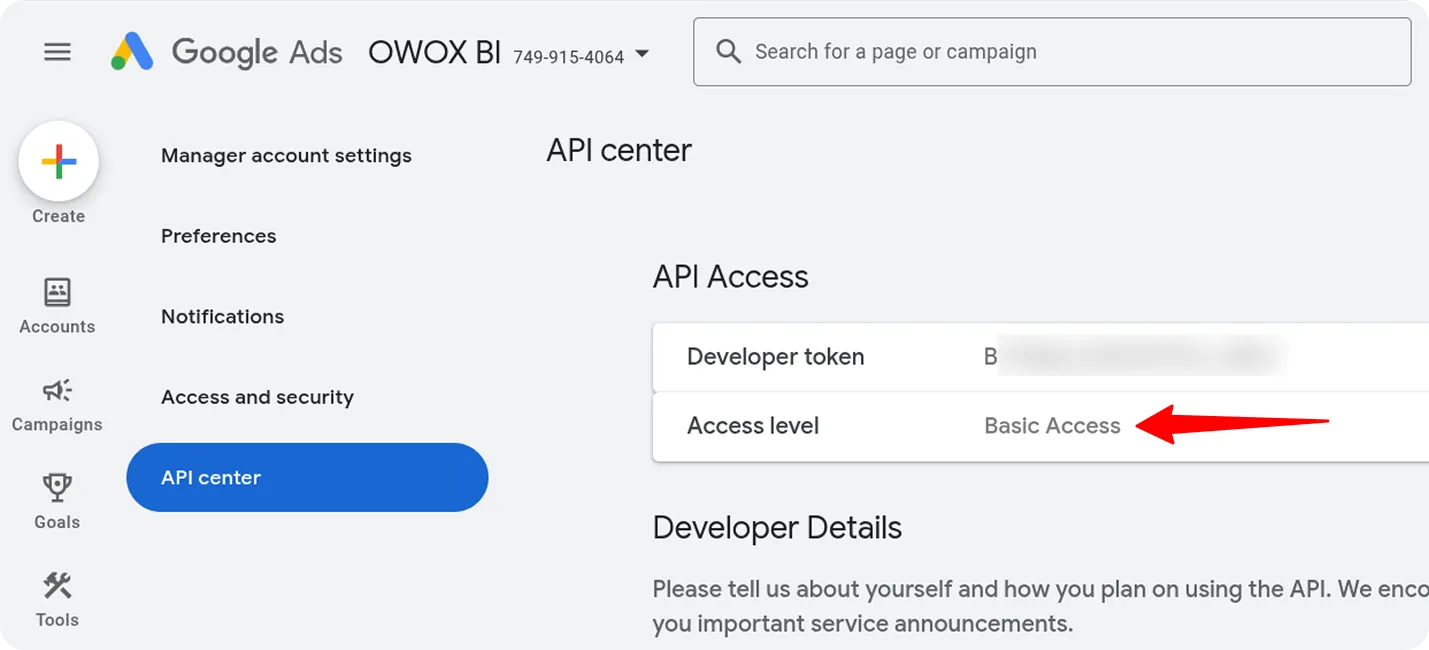
Open your Manager (MCC) account and find API Center
If you don't have a Manager account yet, create one at ads.google.com/home/tools/manager-accounts/ before continuing.You must be inside the Manager Account — not a regular client account. In the top-right of Google Ads you'll see your Manager account ID. From there: Admin → API Center.
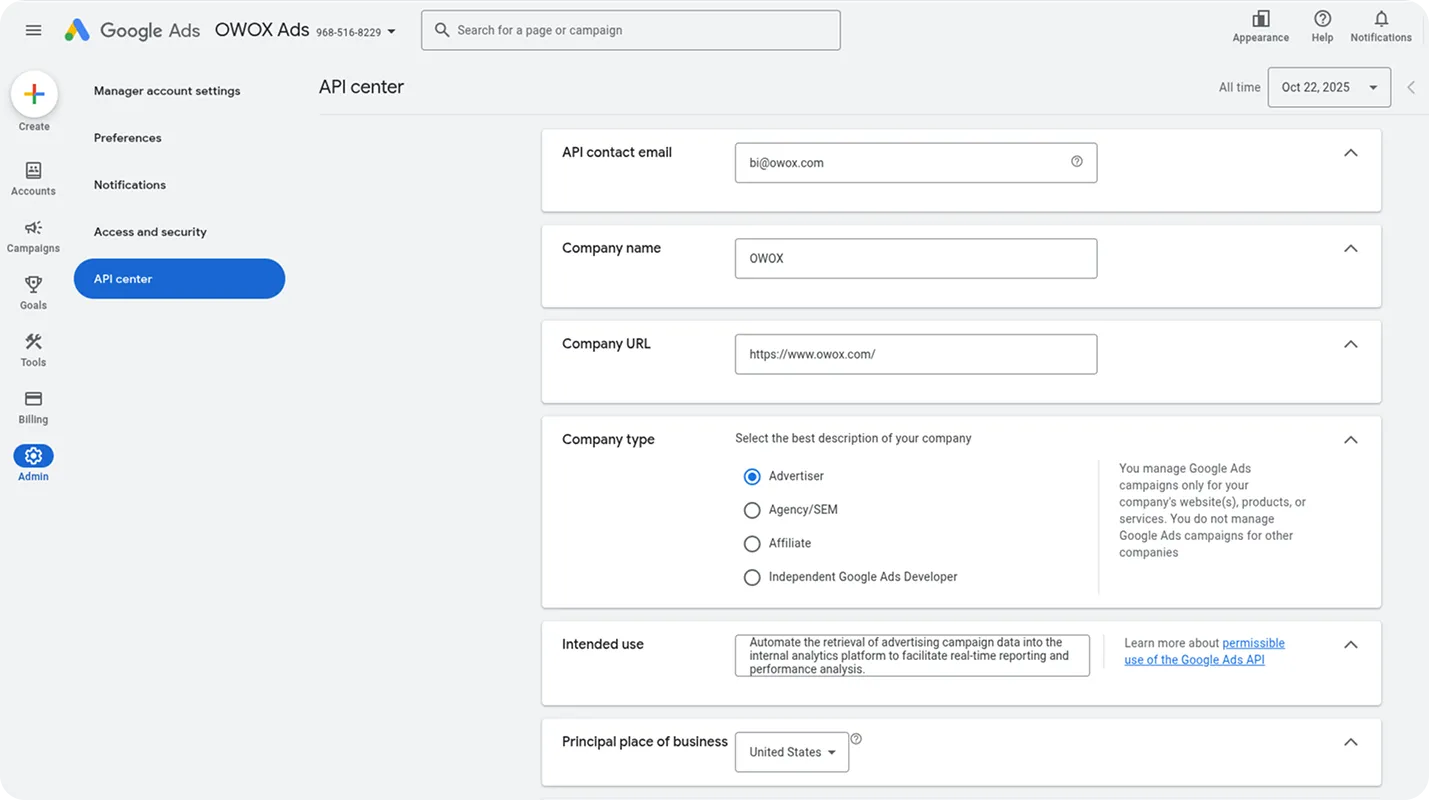
Fill in the API Center registration form
You only do this once. Fill in every field — Google reviews these manually.
- →API Contact Email — your business email
- →Company Name — your agency or business name
- →Company URL — your website
- →Company Type — select "Agency" if you manage client accounts
- →Intended Use — write something like: "Internal keyword research tool for planning local business Google Ads campaigns using the Keyword Planner API"
- →Principal Place of Business — your country
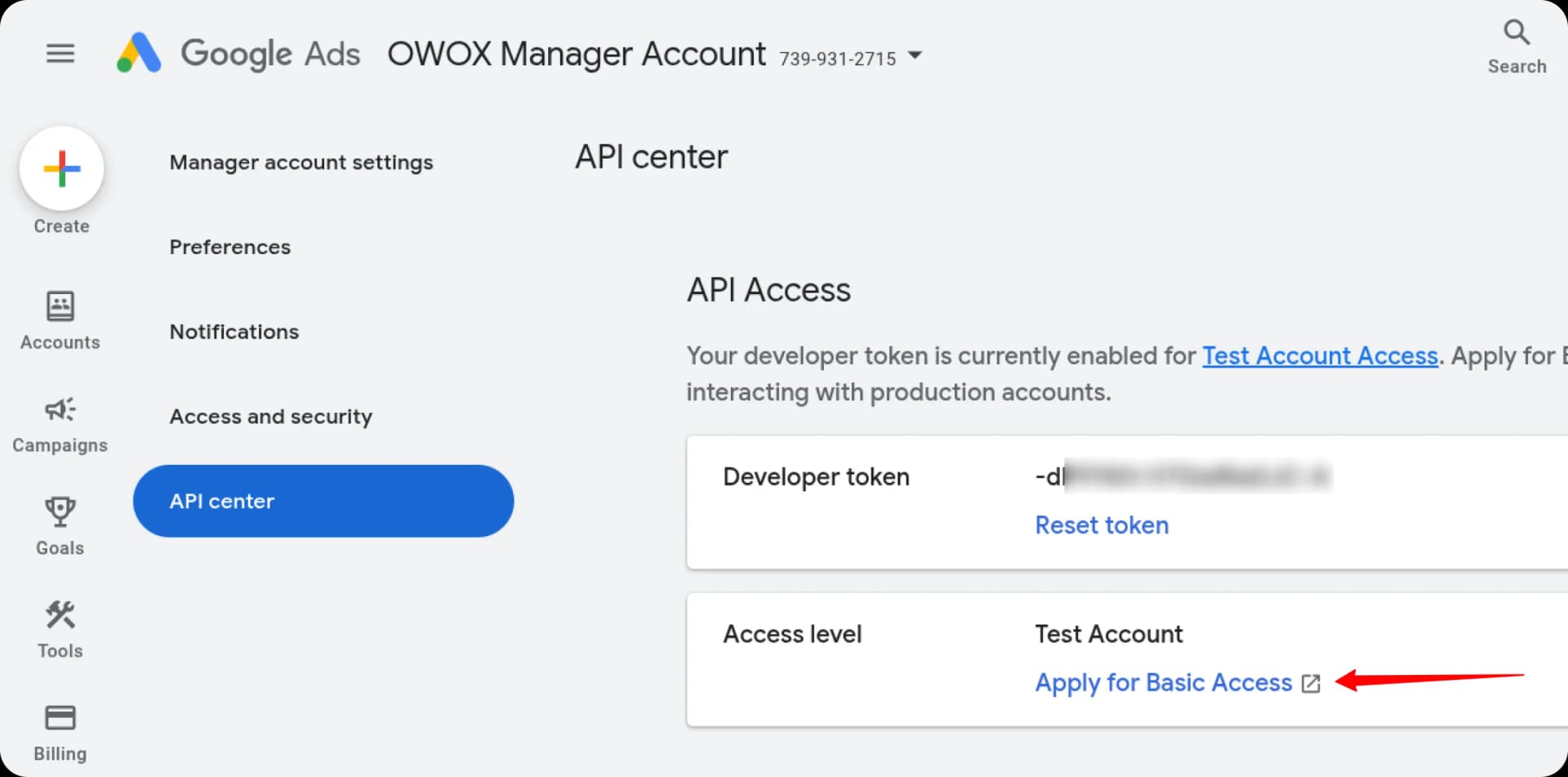
Apply for Basic Access
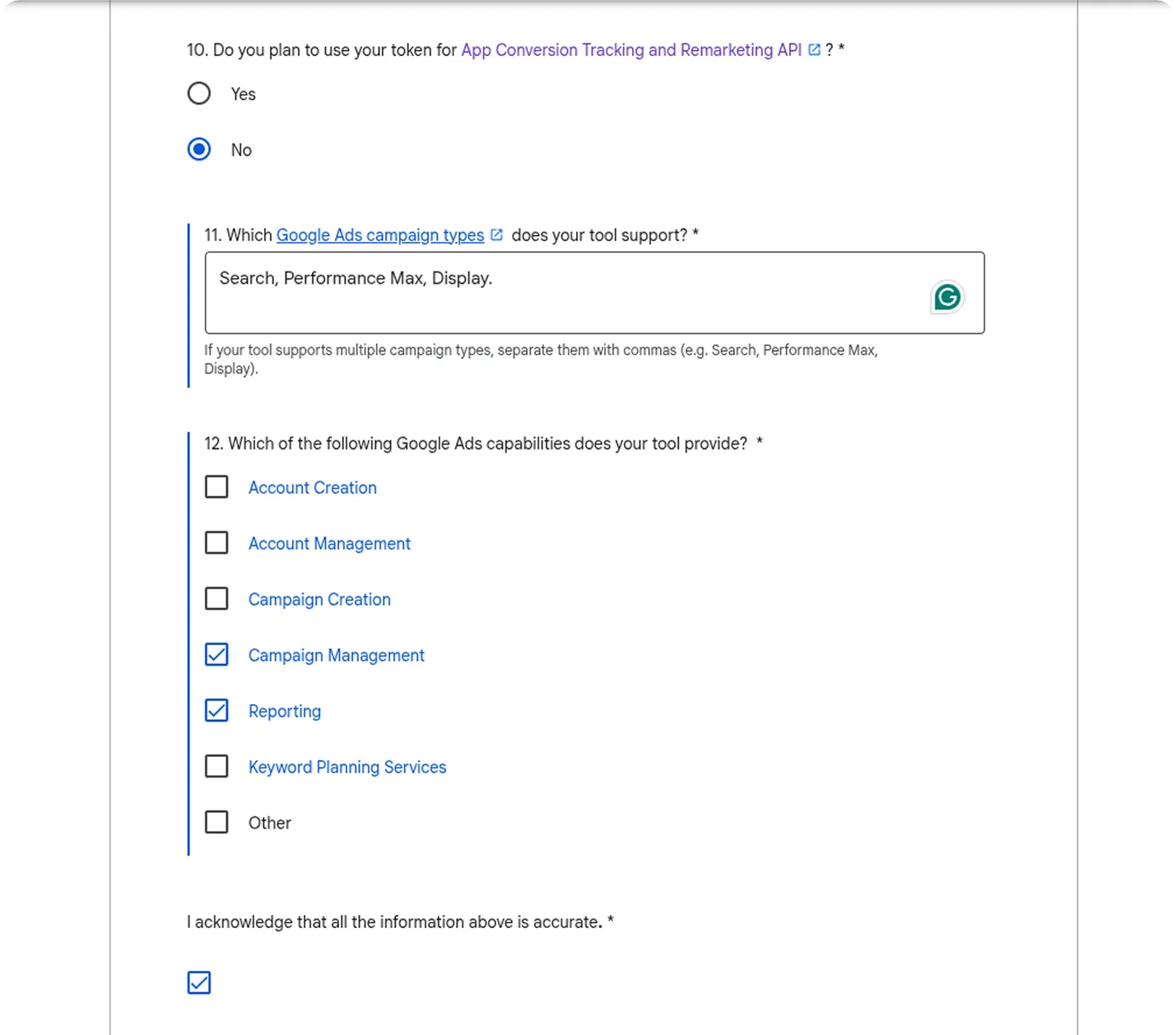
Click "Apply for Basic Access" on the API Center page. This opens a longer form. Here's exactly what to fill in:
- →Company details — same as step 2
- →Business model description — explain how you use Google Ads (e.g. "We manage Google Ads campaigns for local home service businesses — roofing, HVAC, plumbing")
- →"Do you plan to use your Google Ads API token with a tool developed by someone else?" → Select No (keyword-planner.js is your own script)
- →"Do you plan to use your token for App Conversion Tracking and Remarketing API?" → Select No
- →Capabilities — check Reporting (covers Keyword Planner access)
Create a clean, dedicated Google Cloud project
Go to console.cloud.google.com → click the project dropdown at the top → New Project. Name it something clear: "keyword-planner" or "gads-keyword-tool".
Enable the Google Ads API on your new project
Inside your new project: go to APIs & Services → Library → search for "Google Ads API" → click it → click Enable. This takes about 10 seconds.
Create an OAuth2 client (Web Application type)
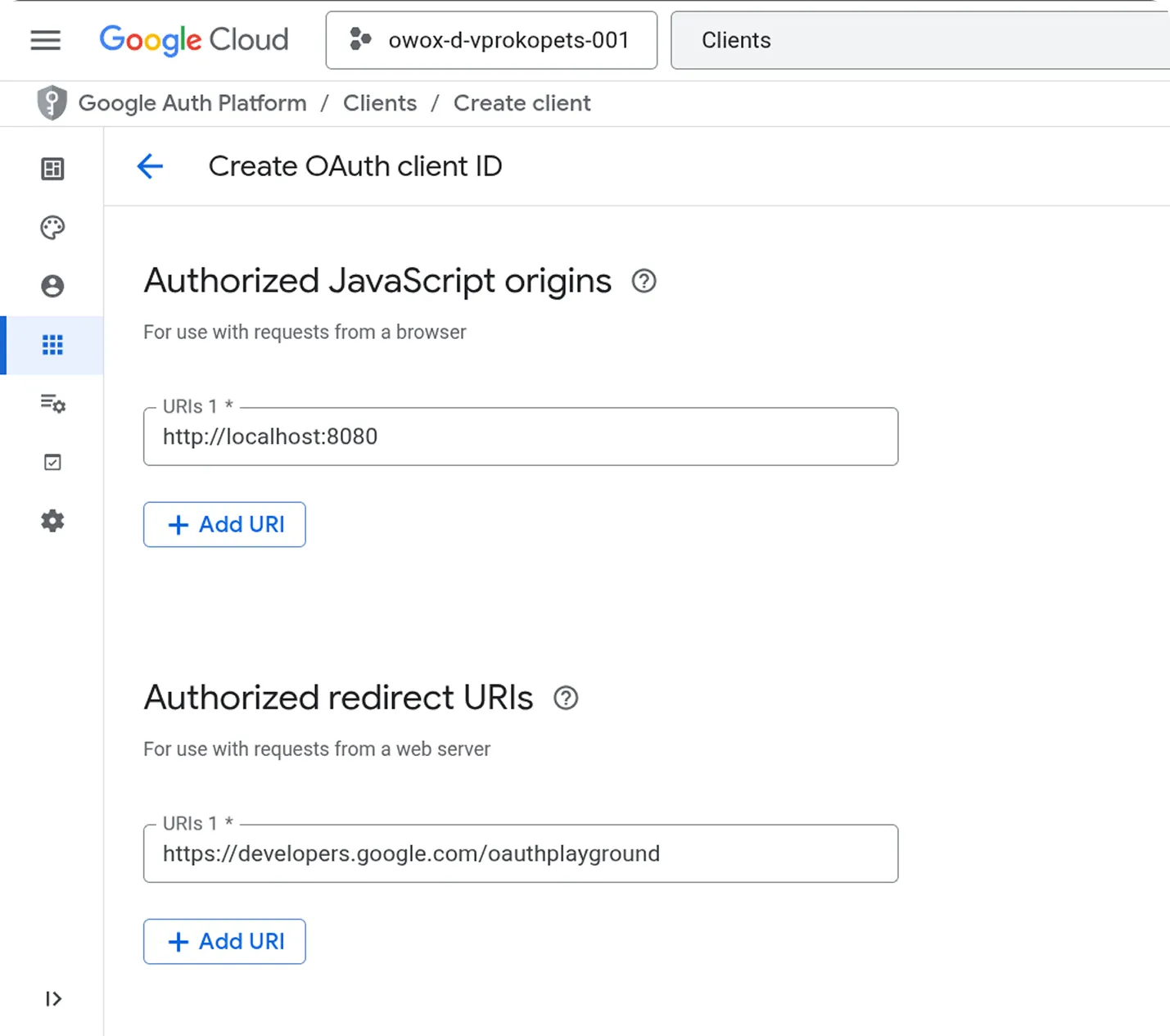
Go to Google Auth Platform → Clients → click Create Client. Fill in the following:
- →Application type: Web Application
- →Name: anything — e.g. "Keyword Planner OAuth"
- →Authorized JavaScript origins: http://localhost:8080
- →Authorized redirect URIs: https://developers.google.com/oauthplayground
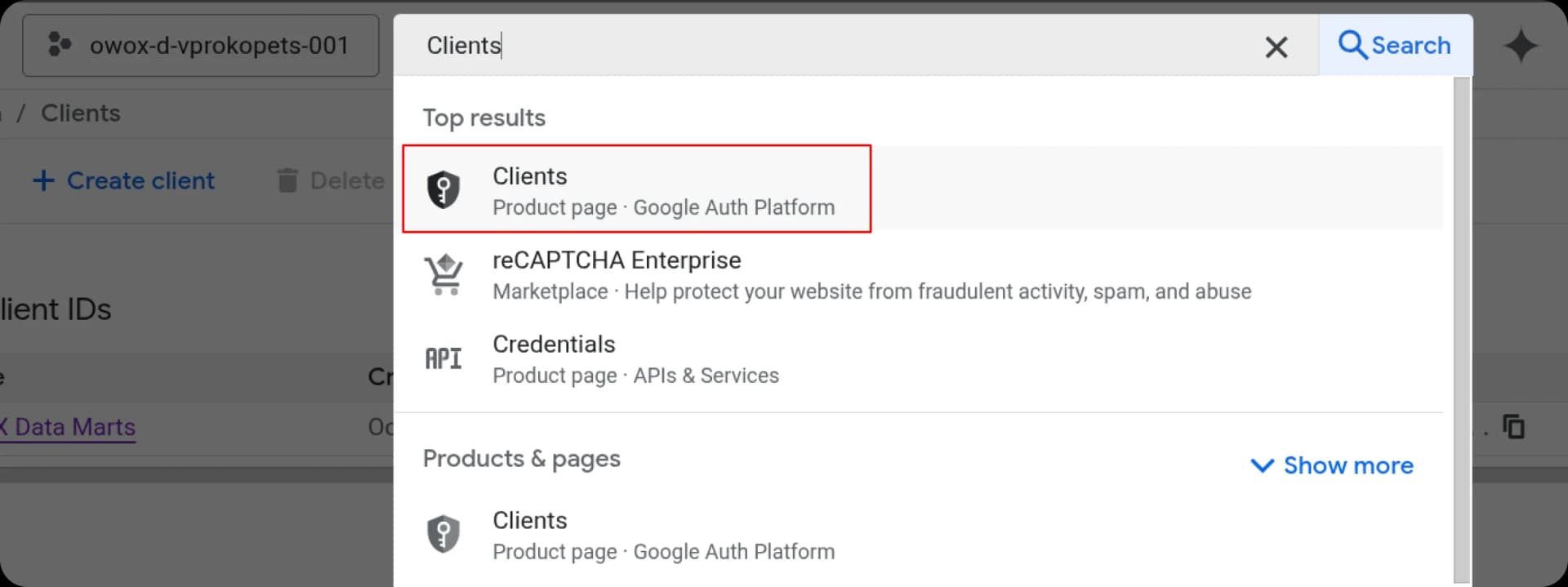
Copy your Client ID and Client Secret
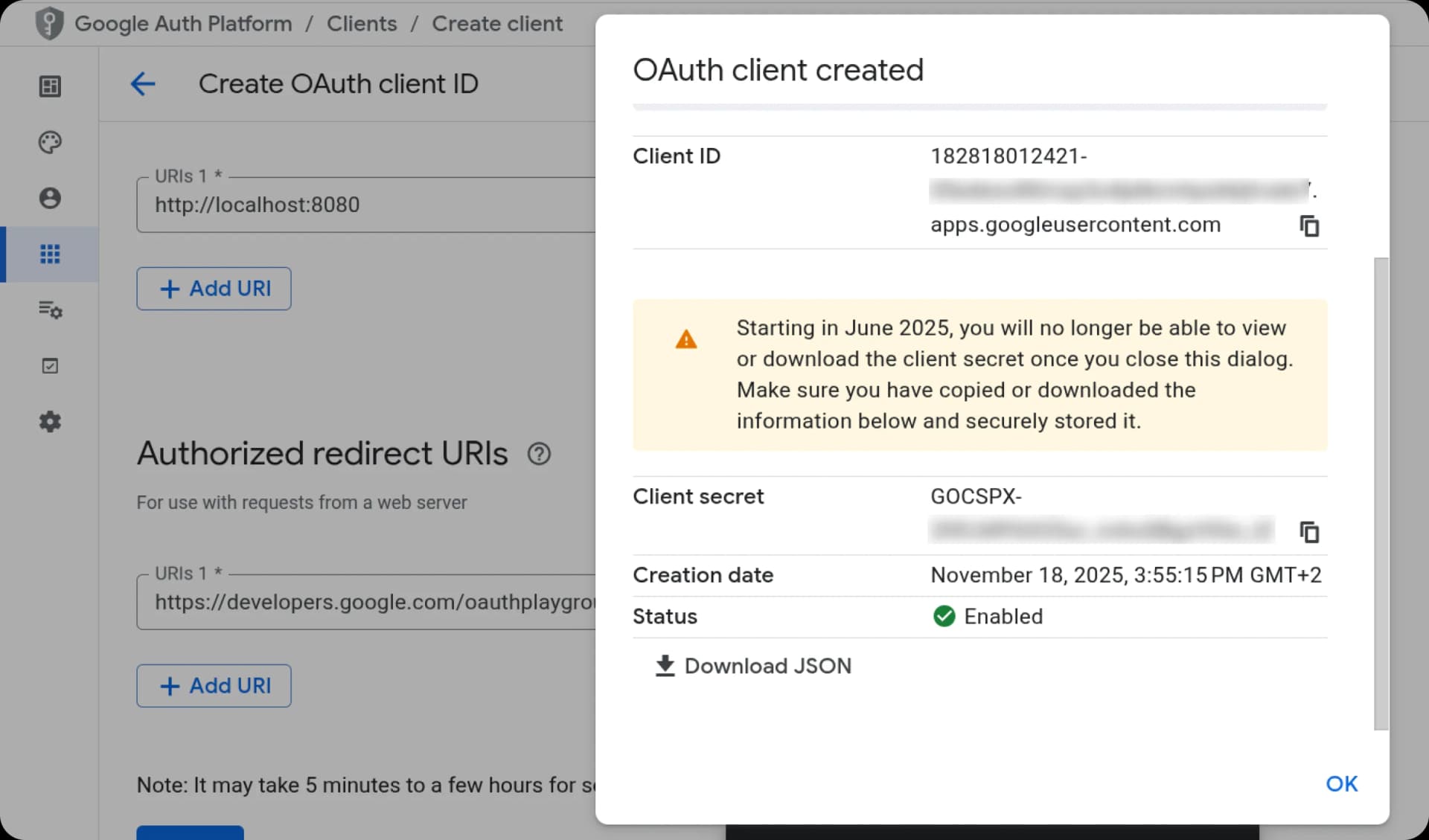
After clicking Create, Google shows you your Client ID and Client Secret. Copy both and store them somewhere safe — you'll need them in the next step. You can also download the JSON file which contains both.
Open OAuth Playground and enter your credentials
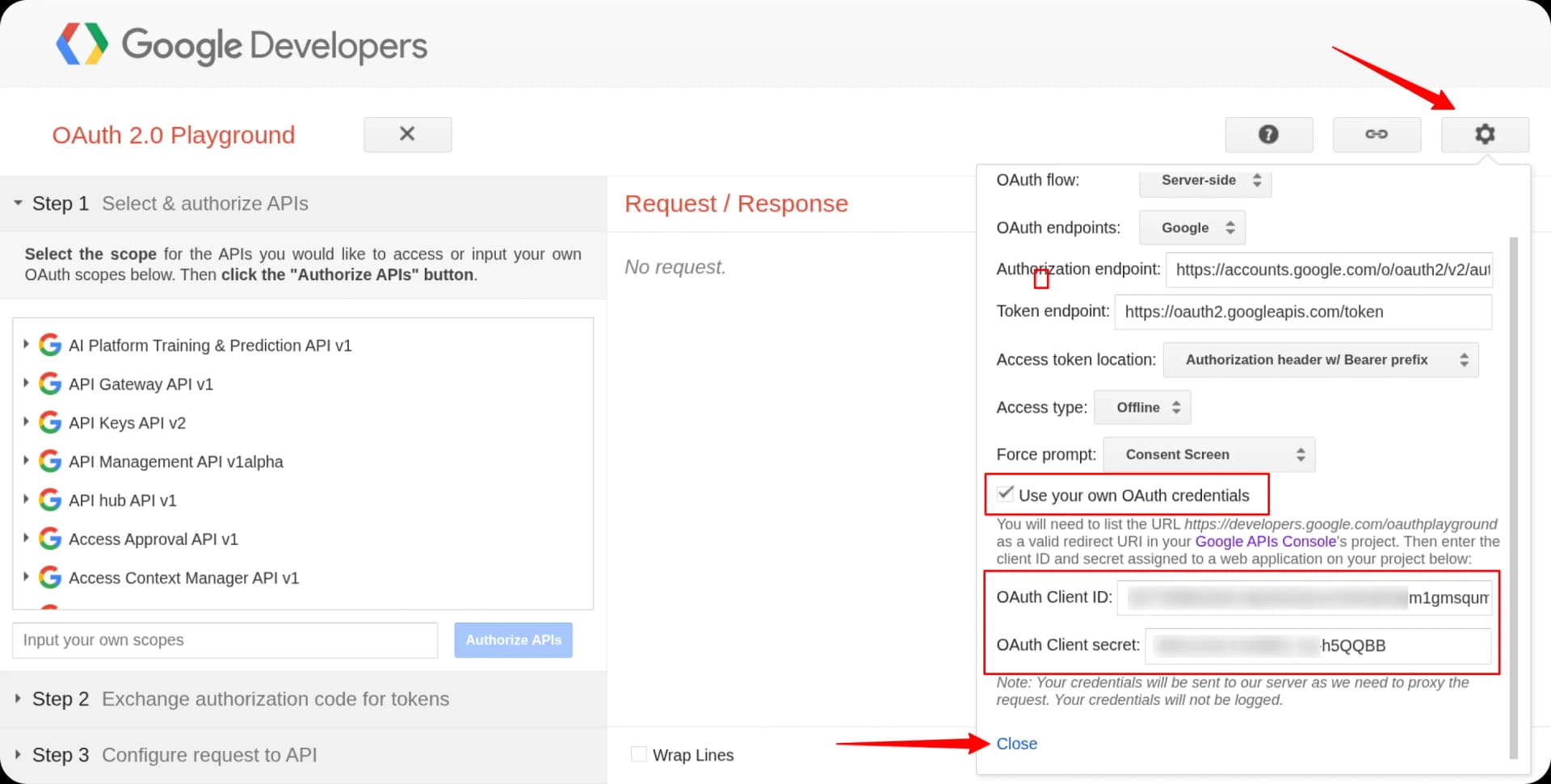
Go to developers.google.com/oauthplayground. Click the gear icon in the top-right → enable "Use your own OAuth credentials" → paste your Client ID and Client Secret → click Close.
Authorize the Google Ads API scope
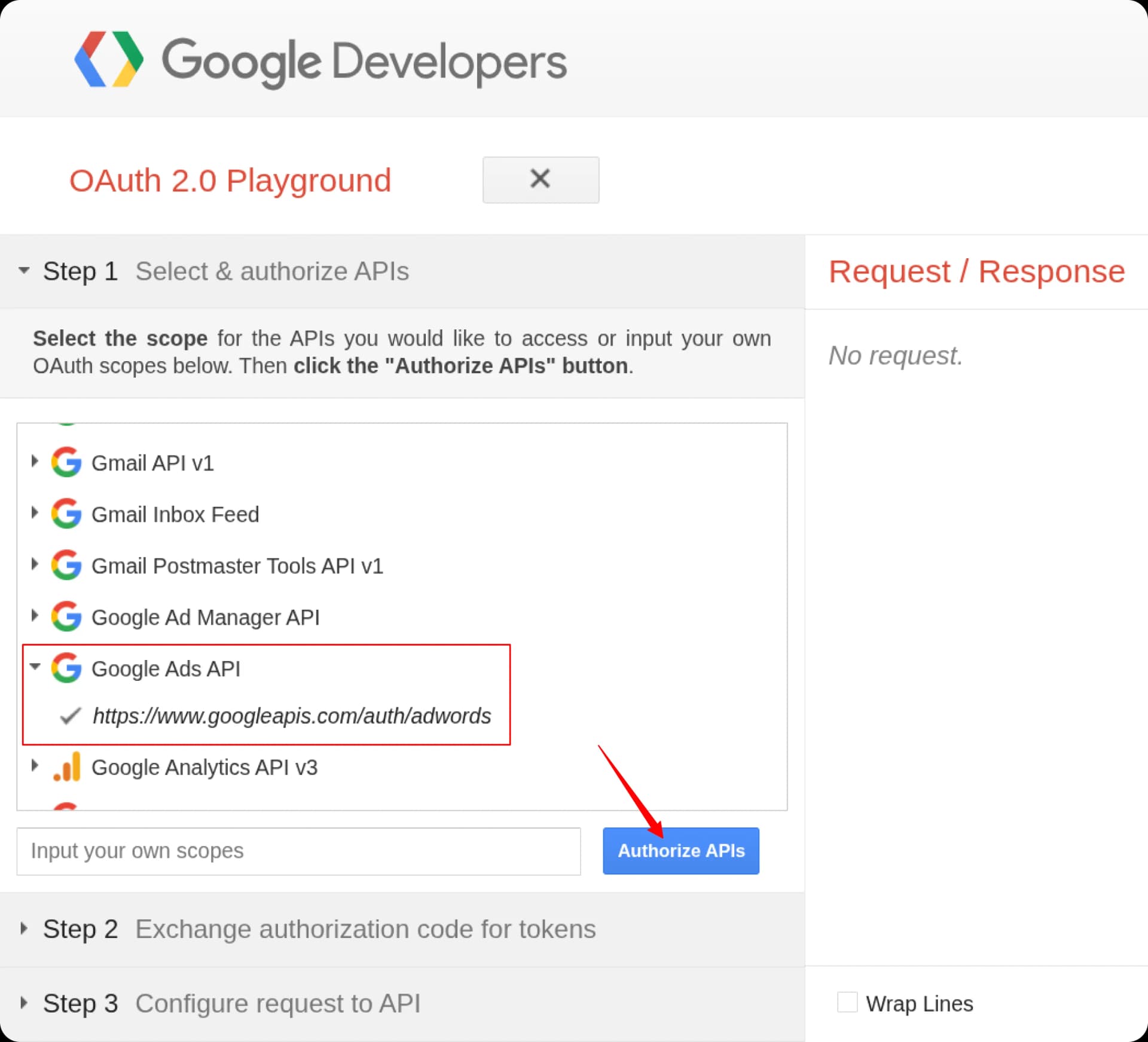
In the left panel, scroll down to find "Google Ads API" and select it. Then click "Authorize APIs". Google will ask you to sign in — use the Google account that has access to your Manager (MCC) account. Grant access when prompted.
Exchange the authorization code for tokens
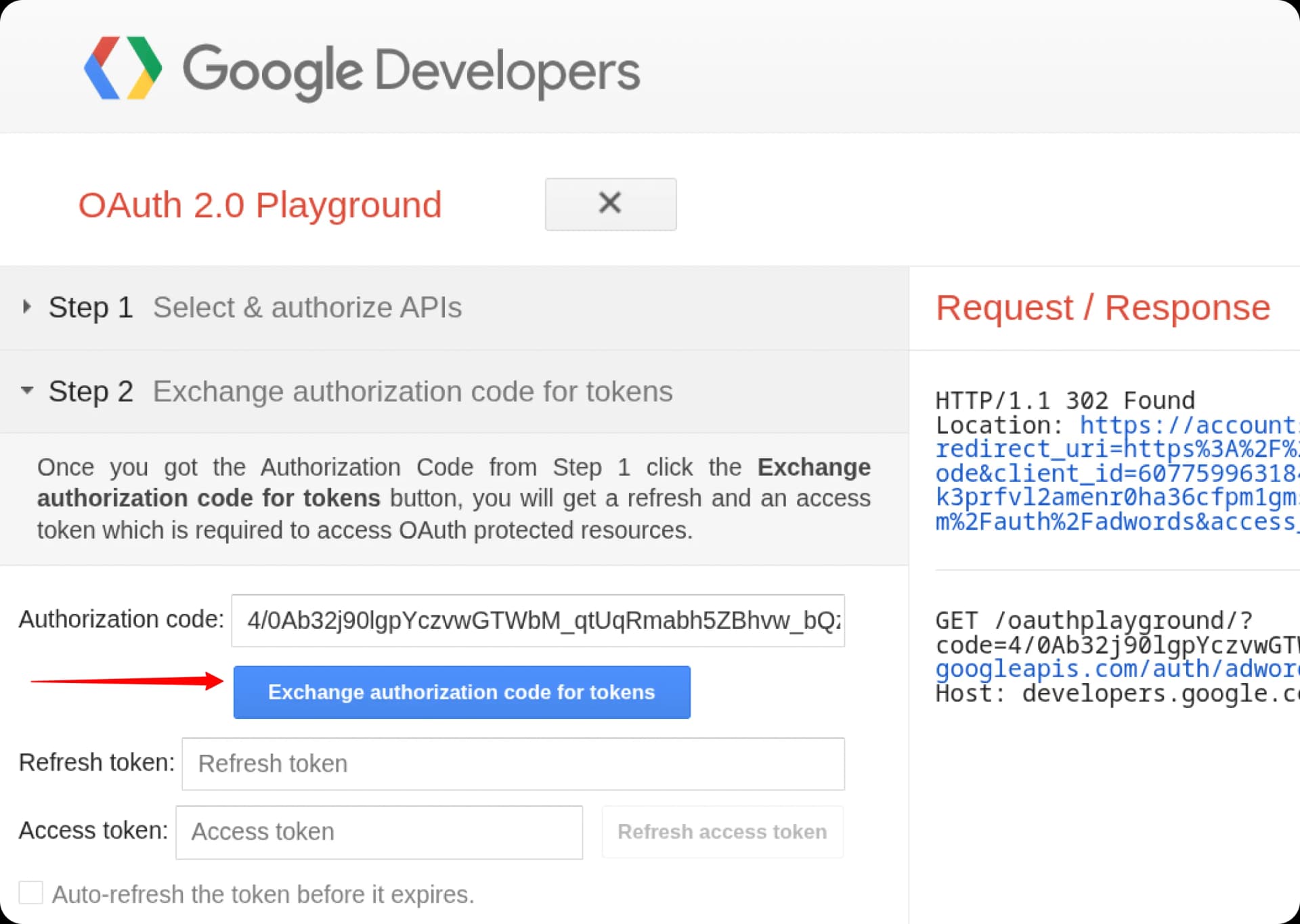
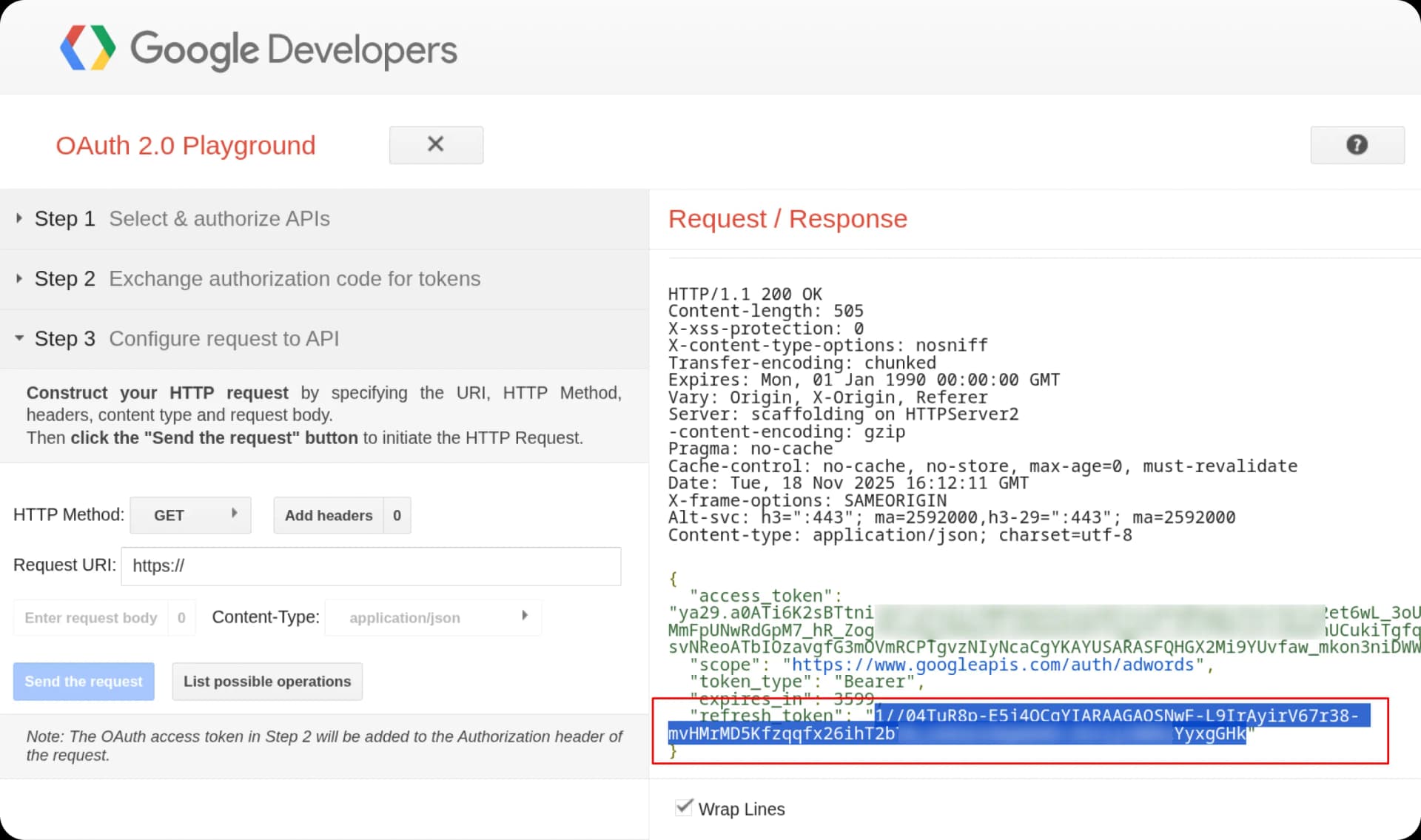
After granting access, you're redirected back to OAuth Playground. Click "Exchange authorization code for tokens". The Refresh Token appears on the right side of the screen.
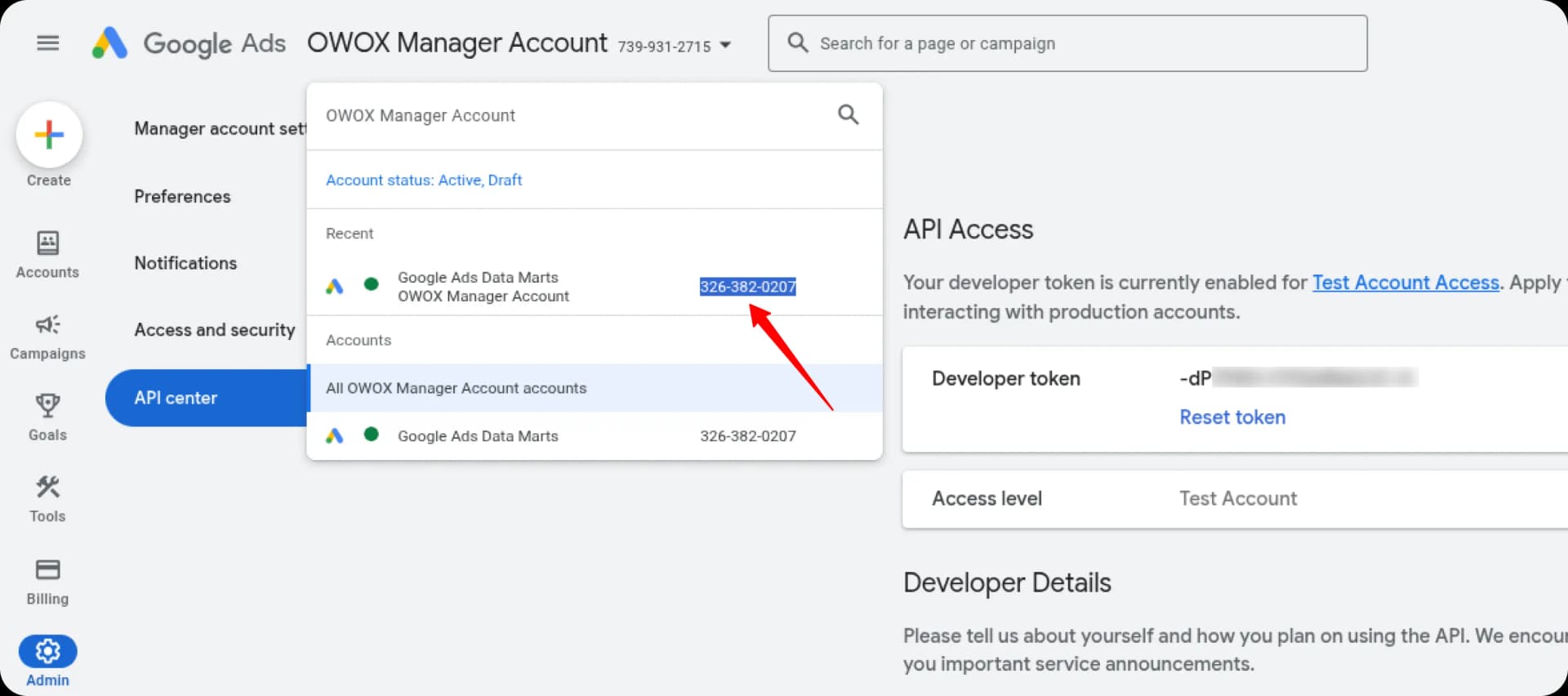
Find your Developer Token and Customer IDs
You now need three more values from Google Ads:
- →Developer Token — go back to your MCC → Admin → API Center. It's listed there (starts with letters and dashes, ~20 chars).
- →Login Customer ID — the ID in the top-right of your Manager (MCC) account. Digits only, no dashes. This is always the MCC ID.
- →Customer ID — the ID of the specific ad account you want to pull keyword data for. Digits only. If you're doing keyword research for a client, use their account ID.
Add all credentials to your .env file
Create a .env file in the folder where you'll run keyword-planner.js. Paste all five values:
GADS_DEVELOPER_TOKEN=your-developer-token-here
GADS_CLIENT_ID=your-client-id.apps.googleusercontent.com
GADS_CLIENT_SECRET=your-client-secret
GADS_REFRESH_TOKEN=your-refresh-token
GADS_CUSTOMER_ID=1234567890
Place the helper script and test it
Move keyword-planner.js into a scripts/ folder alongside your .env. Run this to confirm the whole chain works:
mkdir -p scripts
mv ~/Downloads/keyword-planner.js scripts/keyword-planner.js

node scripts/keyword-planner.js \
  --services "roof repair, storm damage, gutter install" \
  --location "Austin TX" \
  --limit 20
If it works, you'll see JSON output like this:
[
  { "text": "roof repair austin", "avgMonthlySearches": 880, "competition": "HIGH", "avgCpcDollars": 9.20 },
  { "text": "storm damage repair austin tx", "avgMonthlySearches": 390, "competition": "HIGH", "avgCpcDollars": 11.40 },
  ...
]Common Errors — What They Actually Mean
If something breaks, the error message usually tells you exactly which step went wrong.
DEVELOPER_TOKEN_PROHIBITEDYour token is permanently bound to a different GCP project. Create a new GCP project, new OAuth credentials inside it, and redo the auth flow from Step 4.
invalid_grant (401)Your refresh token is invalid or the Google account you authorized with lost access to the MCC. Re-run Phase 3 (Steps 8–10) to get a fresh token.
redirect_uri_mismatchThe redirect URI in your GCP OAuth client doesn't match. Go to GCP → your OAuth client → make sure Authorized redirect URIs includes https://developers.google.com/oauthplayground exactly.
CUSTOMER_NOT_FOUNDGADS_CUSTOMER_ID has dashes, or it's a sub-account ID when it should be the MCC ID. Strip all dashes and use the Manager account ID.
avg_monthly_searches is nullNormal for very new or very niche keywords — Google has no historical volume data for them. They still appear in output with null volume.
Request had insufficient authentication scopesYou authorized the wrong API scope in OAuth Playground. Re-do Steps 8–10 and make sure you selected "Google Ads API" specifically.
Screenshots adapted from OWOX documentation
Path A — Skill only
- Keywords by service and intent tier
- Match type per keyword (Exact/Phrase/Broad)
- Negative keyword list
- Campaign structure on request
- RSA headlines and descriptions
Path B — Skill + Google Ads API
- Everything in Path A, plus:
- Exact monthly search volume
- Top-of-page bid estimates (low + high)
- Competition score from Google
- Budget recommendation based on real CPC
Ready to build your first keyword strategy?
Fill in your details on the right — downloads unlock instantly on this page. No email sent to you.

Built and used on real client campaigns by Anastasios Tzenos
Anastasios Tzenos
I build Google Ads systems and AI tools for local service businesses at Ad-Hive. This skill runs live on client campaigns. I publish what I build because the agency world hoards too much. More skills coming — follow me on LinkedIn to see them first.